Parallel Courseware
Beyond Linear Learning: Experience the Power of Parallel Courseware
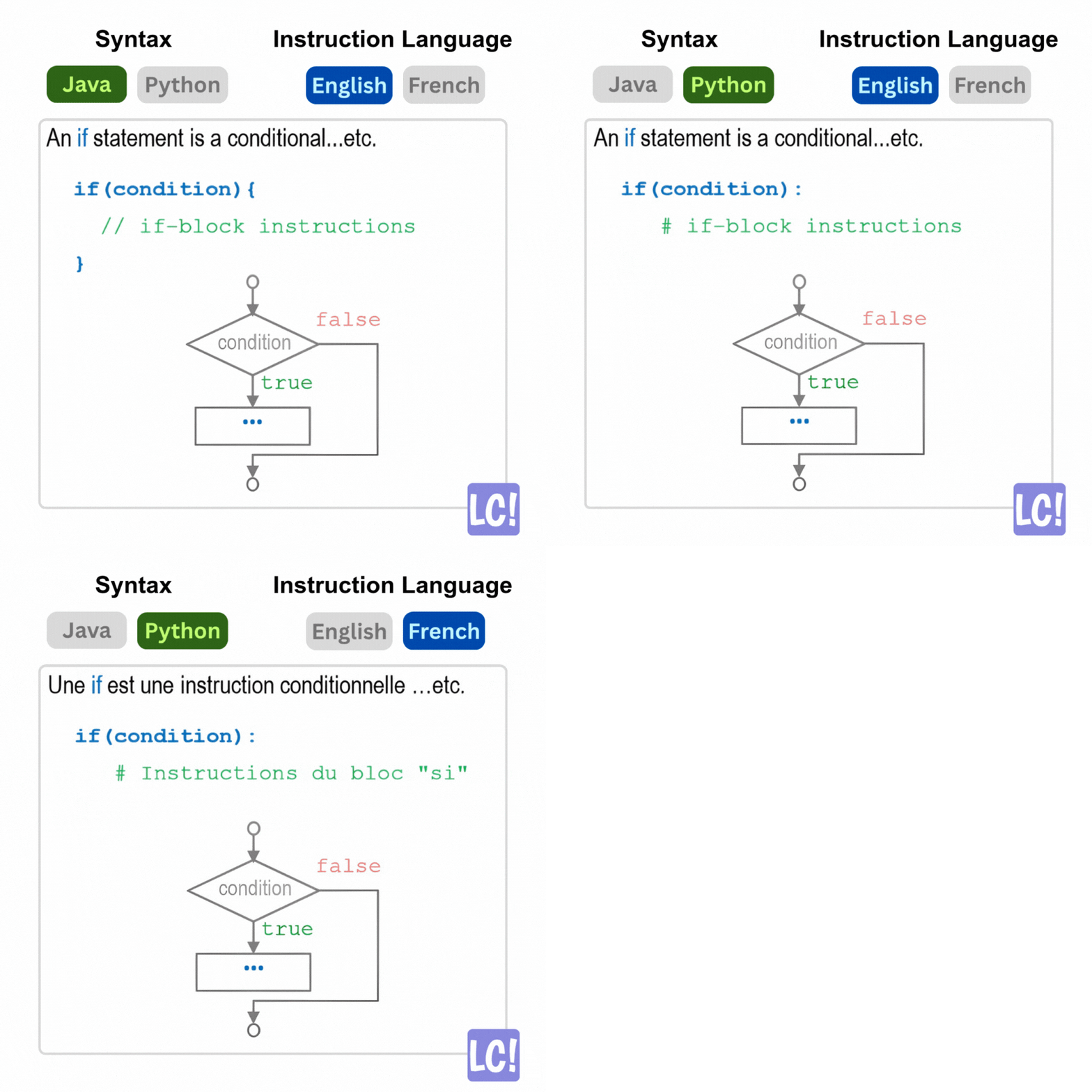
What is Parallel Courseware?
How It Works
For example, a paragraph introducing 'for-loops' might display its explanation and a simple code snippet in Java in one version, and then instantaneously switch to the equivalent explanation and code snippet in Python when that language is selected.
Key Feature: Only one version is displayed at any given
time, but you can switch between them instantly to compare and contrast
different approaches.
Why Choose Parallel Courseware?
The aim is to give students direct control over their learning environment, facilitating comparative exploration, enhancing skill transfer, and enabling truly personalized learning experiences tailored to their explicit choices and needs.
This ultimately fosters better understanding and greater interest in the learning material by allowing you to see concepts from multiple perspectives and in different contexts.
See Parallel Courseware in Action
Perfect For:
Learning environments where the same concepts can be
taught through various tools and technologies
Students who want to compare different programming
languages side-by-side
Anyone seeking a personalized learning experience with
instant context switching
Our Services
Providing you with the best ways to improve your programming skills.
Practice
Practice from many programming questions across multiple languages and difficulty levels.
Structured Learning
Complete organized lessons and track your progress from the many courses offered.
Earn Badges
Collect digital badges to display them on your profile and showcase your progress and achievements.
Key Features
Multiple Question Types
Complete questions in various formats including coding questions and multiple choice questions.
Different Skill Levels
Complete questions at different skill levels — Beginner and Advanced
Coding Sandboxes
Experiment with code examples in executable code environments (Try-Code) to promote hands-on learning.
Visual Code Execution
Visualize code execution step-by-step (Visualize-Code) in real-time to understand control flow and memory behavior.
Domain-Specific Content
Localize coding examples and exercises to learners' preferred domains or fields of study (e.g., Math, Physics, Statistics).
Auto-Graded Exercises
Quizzes and exercises are automatically graded for formative assessment, providing clear feedback on errors and adapting to individual learner preferences.
Frequently Asked Questions
Get answers to common questions about LearnCoding
We designed this website to help you learn coding in a way that totally fits you. It has different versions of material (we call them parallel courseware), so you can find the perfect fit that works for you!
You can even switch between these versions on the fly to compare-and-contrast the material and get different perspectives. The website offers features to visualize your code step-by-step, run the code live (in sandboxes), and collect digital badges that confirm your progress!
This website introduces an innovative concept: Parallel Courseware. This refers to adaptable learning materials that offer multiple versions, each customized across various dimensions such as programming language, application domain, and content depth.
While all versions cover the same learning objectives, their content is meticulously aligned. This alignment enables seamless switching between customization options, all while maintaining a consistent structure and layout.
For instance, a paragraph introducing 'for-loops' might display its explanation and a simple code snippet in Java in one version. When Python is selected, the system instantaneously switches to the equivalent explanation and code snippet in Python.
- Parallel Courseware: Select your preferred setup for the course material
- Compare and Contrast: Instantly switch between versions to observe differences and similarities
- Visual Code Execution: Run code examples and visualize their execution step-by-step
- Coding Sandboxes: Experiment with code examples in a safe environment
- Auto-graded Exercises: Automatically graded with clear feedback on errors
- Digital Badges: Earn badges upon completing lessons that can be shared on platforms
Yes. You need an account to access the website, learn the material, and collect digital badges upon solving exercises.
What information do I need to provide? Everyone must provide a username of your choice, your name, email address, and password. Optionally, students can provide their Student IDs which are required if the instructor wishes to export grades.
Step 1: Login as Instructor on LearnCoding
Step 2: Go to Canvas Gradebook Manager (Home → Instructor Menu → Manage Canvas Users)
Step 3: Go to Register Student Accounts (second tab) → upload CSV gradebook file exported from Canvas
Once completed, students can link their LearnCoding account with their Student ID, and instructors can export grades from LearnCoding into a CSV file for Canvas import.
Our goal is to empower students with direct control over their learning environment. This facilitates comparative exploration, enhances skill transfer across different contexts, and enables truly personalized learning experiences tailored to their explicit choices and needs.
Ultimately, this fosters a deeper understanding and greater interest in the learning material.
Experience Parallel Courseware Today
Join students who are learning programming with our adaptive courseware that lets you switch between languages and contexts instantly.